The boilerplate includes a robust background job system for scheduled tasks, cleanup operations, and async processing. Jobs can be code-based handlers or webhook-based for external services.
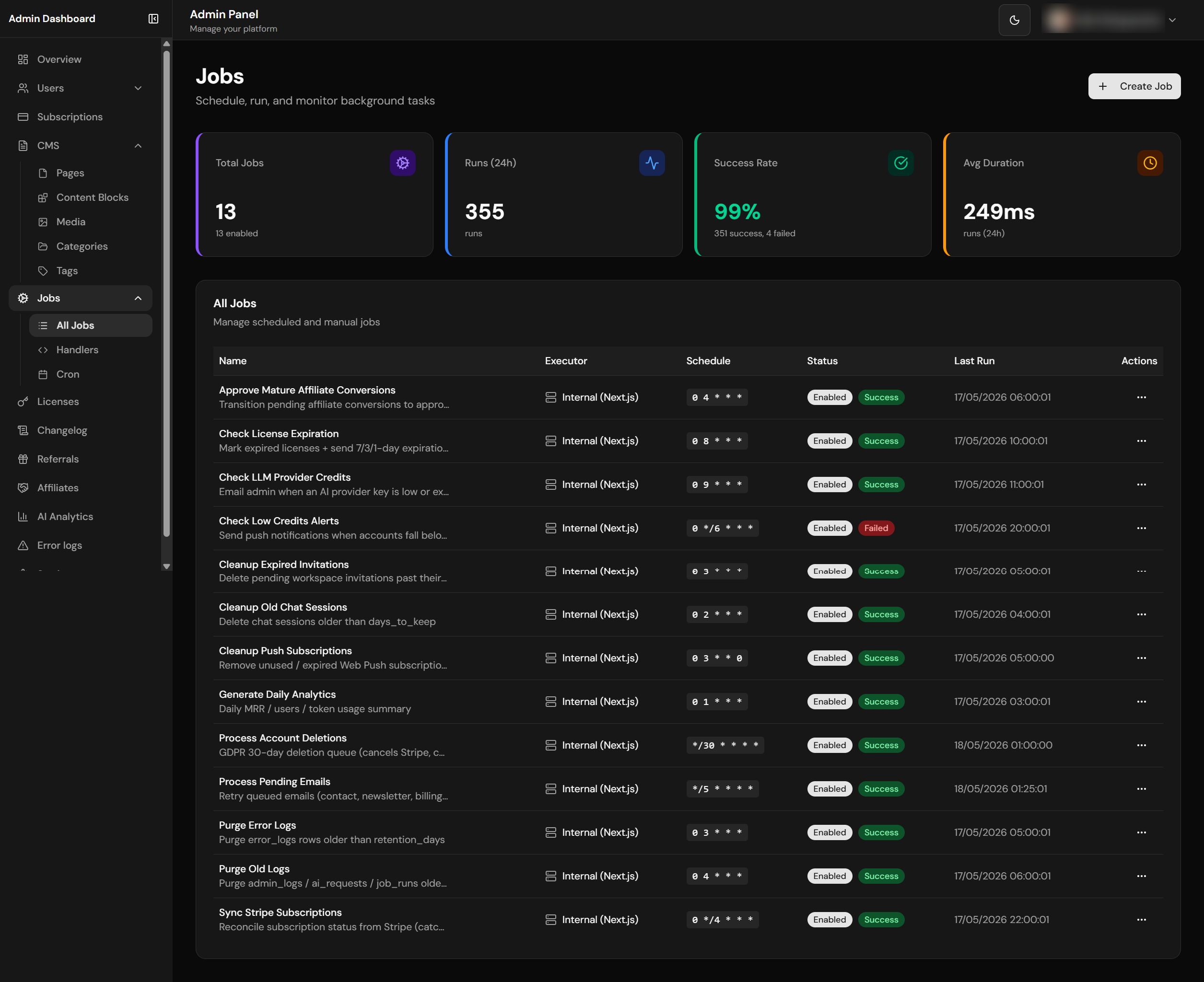
Jobs list with run history and status
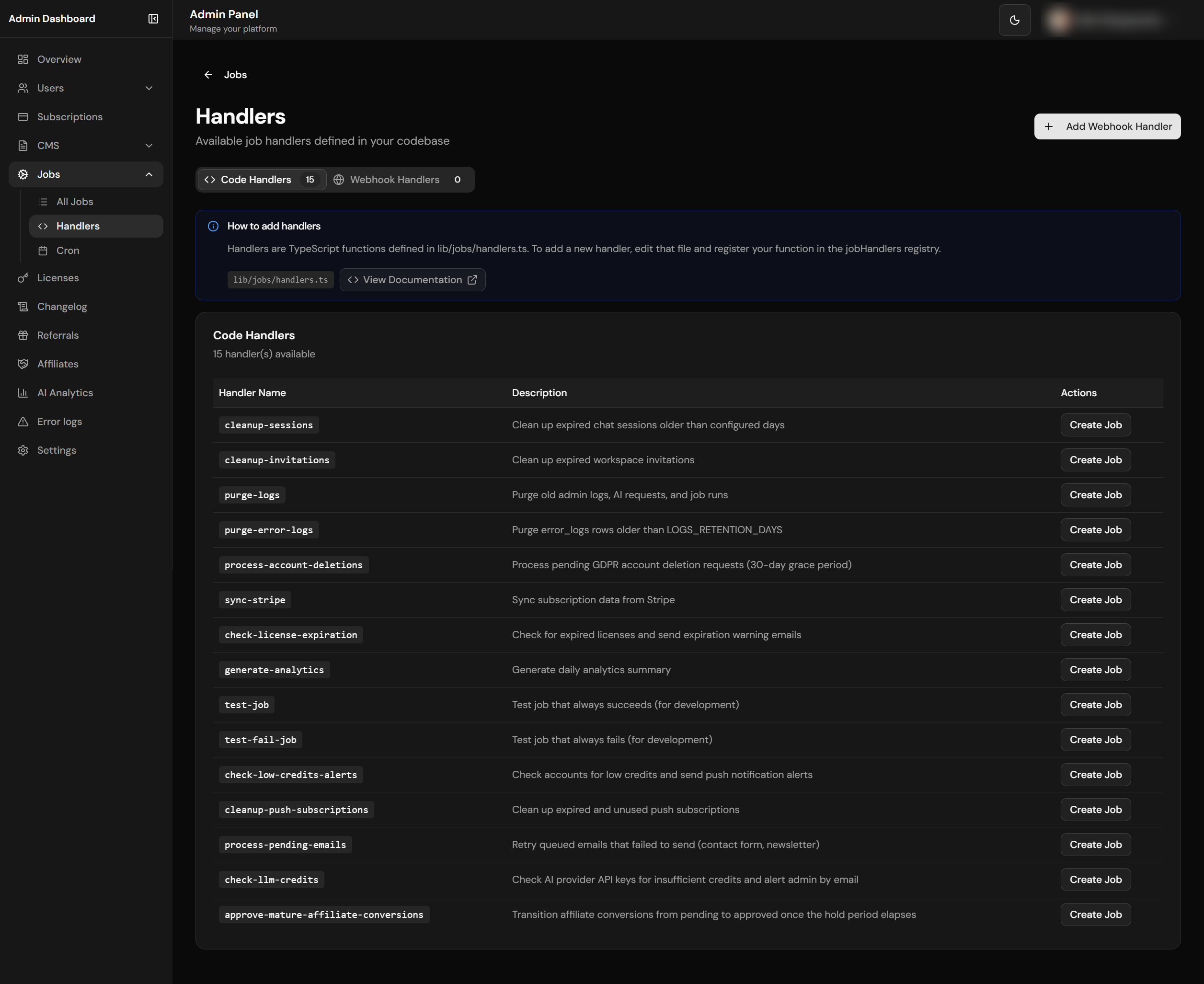
Code and webhook handlers management
Cron Scheduling
Schedule jobs with standard cron expressions.
Code Handlers
TypeScript handlers with full access to your codebase.
Webhook Handlers
Call external URLs with authentication support.
Run History
Complete execution logs with output and errors.
File Structure
lib/jobs/
├── handlers.ts           # Code-based job handlers registry
└── runner.ts             # Job execution engine

types/
└── jobs.ts               # TypeScript interfaces

app/
├── [locale]/(admin)/admin-dashboard/jobs/
│   ├── page.tsx          # Jobs list & stats
│   ├── new/page.tsx      # Create job
│   ├── [jobId]/page.tsx  # Job detail & runs
│   └── handlers/page.tsx # Handler management
└── api/
    ├── jobs/run/route.ts      # Job execution endpoint
    └── admin/jobs/
        ├── route.ts           # Jobs CRUD
        └── handlers/route.ts  # Handlers CRUD
TypeScript Types
Job-related types are defined in types/jobs.ts and include interfaces for job definitions, run records, handler configurations, and execution results. These types ensure type safety across the job creation, scheduling, and execution pipeline.
Built-in Handlers
13 production handlers + 2 dev-only test fixtures. The Gate column is the feature flag scripts/init-project.js reads to decide whether to seed the row at init time. Test fixtures are skipped by the seed step — admins can create them by hand from /admin-dashboard/jobs if needed.
| Handler | Description | Default Cron | Gate |
|---|---|---|---|
cleanup-sessions |
Delete chat sessions older than days_to_keep (30 by default) |
0 2 * * * |
always |
cleanup-invitations |
Remove expired pending workspace invitations | 0 3 * * * |
always |
cleanup-push-subscriptions |
Remove unused / expired Web Push subscriptions | 0 3 * * 0 |
always |
purge-logs |
Purge admin_logs, ai_requests, job_runs older than days_to_keep (90 by default) |
0 4 * * * |
always |
purge-error-logs |
Purge error_logs rows past LOGS_RETENTION_DAYS |
0 3 * * * |
LOGS_ENABLED=true |
sync-stripe |
Reconcile subscription status from Stripe, including missing local rows from missed create webhooks | 0 */4 * * * |
always |
check-license-expiration |
Mark expired licenses + send 7/3/1-day warning emails | 0 8 * * * |
billingModel ∈ {license, hybrid} |
process-account-deletions |
GDPR 30-day deletion queue (cancels Stripe, cascades data, removes auth users) | */30 * * * * |
always |
check-low-credits-alerts |
Push notifications when accounts fall below their threshold | 0 */6 * * * |
always |
process-pending-emails |
Atomic email retry queue with exponential backoff (1m → 3m → 9m → 15m max) | */5 * * * * |
always |
check-llm-credits |
Email admin when an AI provider key is low or exhausted | 0 9 * * * |
always |
generate-analytics |
Daily MRR / users / token usage summary | 0 1 * * * |
always |
approve-mature-affiliate-conversions |
Reconcile canonical payment proofs and reversals, then approve eligible conversions | 0 4 * * * |
AFFILIATES_ENABLED=true |
purge-affiliate-clicks |
Delete raw affiliate click telemetry after its configured retention period | 30 4 * * * |
AFFILIATES_ENABLED=true |
test-job |
Always succeeds (dev fixture, not seeded by init) | — | dev only |
test-fail-job |
Always fails (dev fixture, not seeded by init) | — | dev only |
Email Queue Claiming
process-pending-emails claims work through the
claim_pending_emails(p_limit) RPC before sending. The RPC is
service-role only, uses FOR UPDATE SKIP LOCKED, moves rows to
processing, increments attempts, and returns a
bounded batch so overlapping cron runs cannot send the same email twice.
Rows stuck in processing for more than 15 minutes are eligible
for a later retry.
Handler-sent customer emails are locale-parameterized. Billing notification
subjects use email.billingNotif.*, license warnings use
email.licenseExpiration.*, and organization deletion notices
use email.orgDeleted.*. Job handlers pass a locale from the
payload, owner profile, or configured default locale instead of hardcoding
a language inside the handler.
Init-Time Seeding
pnpm run init seeds the jobs table with the production handlers above based on the answers given to the wizard:
- Always-on handlers are inserted unconditionally.
- The initialization wizard feature-gates optional jobs. Affiliate integrity migrations also upsert maturation and click-retention jobs for existing installations; once data exists, those financial/privacy obligations continue even while
AFFILIATES_ENABLED=false. - All inserts use
INSERT … ON CONFLICT (name) DO NOTHING, so re-running the wizard never overwrites admin-tuned cron expressions orconfigpayloads. - The
AFTER INSERTtrigger onpublic.jobscallssync_pg_cron_job()per row, so newly seeded rows register with pg_cron immediately using the URL + Vault secret the wizard set earlier in the same run. - After the seed, the wizard re-syncs all enabled rows to cover pre-existing jobs from older runs whose URL / Bearer token may have drifted.
If a feature is enabled after init (e.g. flipping AFFILIATES_ENABLED=true later), either re-run pnpm run init or create the missing job from /admin-dashboard/jobs — function names must match the registry keys above exactly.
Creating a Code Handler
To create a new code-based handler, add a function to lib/jobs/handlers.ts that accepts a job configuration object and returns a result. Register the handler in the handlers map with a unique key. Your handler can access the database, call external APIs, send emails, or perform any server-side operation. The handler receives the job's metadata (including custom config JSON) and should return a success/error status with optional output data.
Admin Email Notifications
The boilerplate includes a centralized admin notification system that alerts the super-admin by email when critical events occur. Notifications are queued via the email retry system for reliable delivery.
| Notification | Trigger | Description |
|---|---|---|
| LLM Credit Alert (Real-time) | AI streaming request fails with 402/429 | Immediate email when a provider returns insufficient credits or quota errors during user AI requests |
| LLM Credit Alert (Scheduled) | check-llm-credits job handler |
Proactive health check through the centralized AI boundary: OpenRouter once in gateway mode, or each configured direct OpenAI/Anthropic/Google key |
| Job Failure Alert | Job fails with notify_on_failure enabled |
Email with job name, error details, run ID, and duration when a flagged job fails |
Use sendAdminNotification() from lib/email/admin-notifications.ts to send custom admin alerts:
import { sendAdminNotification } from '@/lib/email/admin-notifications'

await sendAdminNotification({
  subject: '[Alert] Something important',
  title: 'Alert Title',
  body: 'Description of what happened.',
  details: {
    'Key': 'Value',
    'Another Key': 'Another value',
  },
  tags: ['admin-notification', 'custom'],
})
Cron Expressions
| Expression | Description | Use Case |
|---|---|---|
*/5 * * * * |
Every 5 minutes | Health checks, quick syncs |
0 * * * * |
Every hour | Cache refresh, metrics |
0 3 * * * |
Daily at 3am | Cleanup, reports |
0 0 * * 0 |
Weekly on Sunday | Weekly digest, backups |
0 0 1 * * |
Monthly on 1st | Monthly reports, billing |
Job Execution API
The job execution endpoint at /api/jobs/run accepts job triggers from cron schedules, manual admin actions, or external webhooks. Cron/webhook calls authenticate with Authorization: Bearer JOBS_SECRET_KEY using constant-time comparison, webhook rate limiting, and bounded JSON parsing. Manual dashboard runs authenticate as an admin session and additionally require Origin/CSRF validation plus the 30/min/route admin-write limit. After auth, the route loads the job definition, resolves the handler (code-based or webhook), and executes it with timeout protection and error handling.
Webhook Handlers
Webhook handlers call external URLs instead of running local code. Useful for integrating with external services or serverless functions.
Handler create/update APIs validate and sanitize all editable fields, require
http or https URLs, reject localhost/private
network targets, and never return stored webhook auth secrets from list or
detail responses.
Job Runner
The job runner in lib/jobs/runner.ts manages the execution lifecycle: it creates a job_runs record, invokes the handler (either a local function from the handlers registry or an HTTP request to a webhook URL), captures the output or error, records the execution duration, and updates the run status. Failed jobs can be configured for automatic retry with configurable delays.
Database Schema
The jobs system uses jobs (definitions with name, cron expression, handler, config, and enabled status), job_runs (execution history with status, output, error, duration, and timestamps), and job_handlers (webhook-based handler definitions with URL, authentication method, and headers). The email worker also uses pending_emails plus the service-role-only claim_pending_emails(p_limit) RPC for concurrency-safe queue claims. Database triggers automatically sync job schedules with pg_cron.
How Jobs Work - Overview
Job Execution Flow
Jobs are stored in the database with their cron schedules. When you create, update, or delete a job, pg_cron is automatically configured via database triggers. No manual SQL needed!
Execution Flow Diagram
┌─────────────────────────────────────────────────────────────────────┐
│                        ADMIN DASHBOARD                               │
│                    /admin-dashboard/jobs                             │
│  ┌─────────────┐  ┌─────────────┐  ┌─────────────┐                  │
│  │ Create Job  │  │ Update Job  │  │ Delete Job  │                  │
│  └──────┬──────┘  └──────┬──────┘  └──────┬──────┘                  │
└─────────┼────────────────┼────────────────┼─────────────────────────┘
          │                │                │
          ▼                ▼                ▼
┌─────────────────────────────────────────────────────────────────────┐
│                     DATABASE TRIGGER                                 │
│               trigger_sync_pg_cron()                                 │
│                                                                      │
│   • On INSERT/UPDATE: Schedule job in pg_cron                        │
│   • On DELETE: Unschedule job from pg_cron                           │
│   • Checks: is_enabled + cron_expression                             │
└──────────────────────────────┬──────────────────────────────────────┘
                               │
                               ▼
┌─────────────────────────────────────────────────────────────────────┐
│                         pg_cron                                      │
│              PostgreSQL Cron Scheduler                               │
│                                                                      │
│   Automatically executes at scheduled times:                         │
│   • Every minute? ─────────► Triggers job                            │
│   • Every hour? ───────────► Triggers job                            │
│   • Daily at 3am? ─────────► Triggers job                            │
└──────────────────────────────┬──────────────────────────────────────┘
                               │
                               │ HTTP POST (pg_net)
                               ▼
┌─────────────────────────────────────────────────────────────────────┐
│                    /api/jobs/run                                     │
│                                                                      │
│   Request:                                                           │
│   {                                                                  │
│     "job_id": "uuid",                                                │
│     "triggered_by": "cron"                                           │
│   }                                                                  │
│                                                                      │
│   Auth: Bearer JOBS_SECRET_KEY or admin session + CSRF               │
└──────────────────────────────┬──────────────────────────────────────┘
                               │
                               ▼
┌─────────────────────────────────────────────────────────────────────┐
│                      JOB RUNNER                                      │
│                  lib/jobs/runner.ts                                  │
│                                                                      │
│   1. Find job by ID or name                                          │
│   2. Check if job is enabled                                         │
│   3. Create job_runs record                                          │
│   4. Execute handler (code or webhook)                               │
│   5. Update job_runs with result                                     │
│   6. Update job statistics                                           │
└──────────────────────────────┬──────────────────────────────────────┘
                               │
              ┌────────────────┴────────────────┐
              ▼                                 ▼
┌─────────────────────────┐       ┌─────────────────────────┐
│     CODE HANDLER        │       │    WEBHOOK HANDLER      │
│  lib/jobs/handlers.ts   │       │   (External URL)        │
│                         │       │                         │
│  • cleanup-sessions     │       │  • Your API endpoint    │
│  • purge-logs           │       │  • Serverless function  │
│  • sync-stripe          │       │  • External service     │
│  • generate-analytics   │       │                         │
└─────────────────────────┘       └─────────────────────────┘
Automatic pg_cron Scheduling
The boilerplate automatically manages pg_cron entries when you create, update, or delete jobs. You don't need to write any SQL - just use the admin dashboard!
| Action | What Happens |
|---|---|
| Create job with cron + enabled | pg_cron entry automatically created |
| Update cron expression | Old pg_cron entry removed, new one created |
| Disable job (is_enabled = false) | pg_cron entry removed (job stops running) |
| Enable job (is_enabled = true) | pg_cron entry created (job starts running) |
| Delete job | pg_cron entry automatically removed |
Cron Admin Dashboard /admin-dashboard/jobs/cron
A live operations view of every entry in the Postgres cron.job table — sibling to the regular Jobs page,
but scoped to raw pg_cron state rather than the public.jobs definitions.
Use it to monitor what pg_cron actually has scheduled, pause/resume entries without deleting their jobs row,
and clean up orphans left behind after job deletes or URL/secret rotations.
Authoring stays in /admin-dashboard/jobs
The cron page intentionally cannot create entries or edit cron expressions in place.
The source of truth is the public.jobs table — adding/editing a row triggers sync_pg_cron_job
which writes the cron entry for you. Letting the cron page create entries directly would bypass that and produce orphans.
What you can do on the page
| Action | Effect |
|---|---|
| Toggle active | Flips cron.job.active. Reversible — pauses/resumes the schedule without unscheduling. |
| Unschedule | Calls cron.unschedule(jobid) and clears jobs.pg_cron_job_id so the next sync_pg_cron_job() takes the "schedule fresh" branch. Gated by recent-auth. |
| Purge orphans | Bulk-unschedules entries whose command targets /api/jobs/run but no longer have a matching public.jobs row. Gated by recent-auth. |
| Stats | Counts (total / active / orphans) plus 24h aggregate from cron.job_run_details (runs and success rate). |
Security model
- Page + API gated by
apiSecurity.admin()(admin role + method/route-scoped limits + CSRF; sensitive job mutations retain 5/min/route). - Destructive actions (unschedule, purge-orphans) require recent auth via
appConfig.security.requireRecentAuthForAdminEscalationMinutes. A session-hijacked admin cannot tear down platform infrastructure (GDPR job, email queue, log purge) in one POST without re-authenticating. - Every mutation writes to
admin_logswith{admin_user_id, action, target_type:'cron_job', details:{jobid, ...}}for forensic trail. - Bearer tokens are redacted at the SQL layer. The
admin_list_cron_jobs()RPC runsregexp_replace(cj.command, 'Bearer\\s+[A-Za-z0-9._\\-]+', 'Bearer ***', 'g')soJOBS_SECRET_KEYnever crosses the API/UI boundary even when the command field is rendered. - Orphan filter is anchored on
command ILIKE 'select net.http_post(%' AND command LIKE '%/api/jobs/run%'so unrelated extension cron jobs (other Supabase extensions, user-defined entries) are never classified as orphans nor purged.
Underlying RPCs
Five SECURITY DEFINER functions, all REVOKE EXECUTE FROM authenticated, anon, public +
GRANT EXECUTE TO service_role, with an auth.role() = 'service_role' guard
inside the body for defense-in-depth:
admin_list_cron_jobs()— left-joinscron.jobtopublic.jobs, marks orphans, redacts Bearer tokens.admin_get_cron_stats()— single-call aggregator (counts + 24hcron.job_run_detailsroll-up).cron.job_run_detailsis wrapped inEXCEPTION when undefined_tableso the query degrades gracefully on older pg_cron.admin_set_cron_job_active(p_jobid bigint, p_active boolean)admin_unschedule_cron_job(p_jobid bigint)admin_purge_orphan_cron_jobs() returns jsonb— returns{ purged, failed }so per-row swallowed errors stay visible.
Prerequisites Setup
Automatic Setup (Recommended)
Run pnpm run init - the initialization wizard automatically:
- Enables pg_cron and pg_net extensions
- Generates JOBS_SECRET_KEY (rejects placeholder/short values)
- Stores the key in Supabase Vault (idempotent rotation on re-runs)
- Configures Jobs API URL in app_settings (warns on localhost vs hosted DB)
- Re-syncs existing jobs so cron commands reflect the new URL + secret
Boot-time URL Sync (automatic)
instrumentation.ts calls lib/jobs/sync-cron-url.ts on every server boot. It reads app_settings.jobs_api_url, compares it to ${appConfig.url}/api/jobs/run, and if they drift it upserts the row and re-runs sync_pg_cron_job(id) for every enabled job in parallel.
Net effect: change NEXT_PUBLIC_APP_URL, redeploy — your cron entries pick up the new URL automatically. No manual SQL, no admin-settings tweak.
- Skipped when
appConfig.urlislocalhost/127.0.0.1— local dev never overwrites a hosted DB's value. - Fast-paths when the URL already matches (one cheap
SELECT, no writes). Steady-state cost ≈ zero. - Fire-and-forget — failures log to
/admin-dashboard/logswith categoryjobsand eventcron_url_sync_*; never blocks server startup. - Vault is deliberately untouched — rotating an active secret on every boot would 401 in-flight cron calls. Use
pnpm run initwhen you need to rotateJOBS_SECRET_KEY.
If you need to set up manually, follow these steps:
Step 1: Enable Extensions
Enable the pg_cron and pg_net extensions in your Supabase project. Go to Database → Extensions in the Supabase Dashboard and enable both. These allow scheduled tasks and HTTP requests from within PostgreSQL.
Step 2: Generate and Store Secret Key
Generate a secure random string for the JOBS_SECRET_KEY. This key authenticates all job execution requests. Store it securely in Supabase Vault for use by pg_cron functions.
Step 3: Add to Environment
Add the same JOBS_SECRET_KEY value to your .env.local file so the Next.js application can authenticate incoming job execution requests. The key must match the value stored in Supabase Vault for pg_cron triggers to work correctly.
Step 4: Configure Jobs API URL
Go to Admin Dashboard → Settings and set the Jobs API URL to your deployed origin plus the job endpoint:
# Production — must be a publicly reachable URL (pg_cron runs on Supabase)
https://your-domain.com/api/jobs/run
CRITICAL: localhost Does NOT Work!
pg_cron runs on Supabase's servers, not your local machine. It cannot reach
localhost:3777 or 127.0.0.1. Even though pg_cron will show "succeeded",
the HTTP request never reaches your local server.
Local Development Options
For testing scheduled jobs during local development, you have two options:
Option 1: Manual Testing (Recommended)
Use the "Run Now" button in the job detail page. This executes the job directly from your browser (bypasses pg_cron) and works perfectly with localhost.
Or use curl (the endpoint takes a Bearer token OR an admin session):
curl -X POST http://localhost:3777/api/jobs/run \
  -H "Authorization: Bearer $JOBS_SECRET_KEY" \
  -H "Content-Type: application/json" \
  -d '{ "job_id": "<uuid-from-admin-dashboard-jobs>" }'
Option 2: Use ngrok (For full pg_cron testing)
Expose your local server to the internet with ngrok, then set the public URL as the Jobs API URL in Admin → Settings:
ngrok http 3777
# Copy the https://<id>.ngrok-free.app URL, then set
# Admin → Settings → Jobs API URL = https://<id>.ngrok-free.app/api/jobs/run
Additional Schema (pg_cron tracking)
The jobs system adds a trigger function that automatically syncs job definitions with pg_cron whenever a job is created, updated, or deleted. When a job's cron expression or enabled status changes, the trigger updates the pg_cron schedule accordingly.
Verification
After setting up, verify everything works:
- In Supabase SQL editor, run
SELECT jobname, schedule, active FROM cron.job;— your enabled jobs should be listed with their cron expressions. - From
/admin-dashboard/jobs, click Run Now on a safe job (e.g.cleanup-sessions) and confirm a new row appears injob_runswithstatus = 'success'. - Check
SELECT * FROM job_runs ORDER BY created_at DESC LIMIT 5;for recent executions and durations. - If
LOGS_ENABLED=true, watch/admin-dashboard/logsfor anyjobs-category errors after the first scheduled tick.
Troubleshooting
| Issue | Solution |
|---|---|
| Job created but not running | Check: is_enabled = true, cron_expression set, Jobs API URL configured |
| pg_cron entry not created | Verify jobs_api_url in app_settings is not empty. On modern deploys this row is auto-synced from NEXT_PUBLIC_APP_URL at server boot — if it's still empty, check /admin-dashboard/logs for events with category jobs + event cron_url_sync_*. |
| cron.job.command points to localhost or stale URL | The boot-time sync (lib/jobs/sync-cron-url.ts) re-syncs on URL drift, but it is skipped when appConfig.url is itself localhost. Set NEXT_PUBLIC_APP_URL to your public URL and redeploy. To force-sync immediately, run SELECT sync_pg_cron_job(id) FROM jobs WHERE is_enabled = true; in the Supabase SQL editor. |
| HTTP 401 Unauthorized | Check jobs_secret_key exists in Vault and matches JOBS_SECRET_KEY env. Common cause: .env.local still has the placeholder your-secret-key-here (or a suffixed variant like your-secret-key-here-test-2014-test) — the wizard now rejects these, so re-run pnpm run init to rotate Vault and the env value together. Note: the boot-time sync deliberately does not rotate Vault. |
HTTP 401 + secret looks right, query string in net._http_response contains ?Authorization=Bearer%20… |
The Bearer is being sent as a URL query parameter, not a header.
On pg_net >= 0.7 the third positional argument of net.http_post() is params, not headers.
If schedule_pg_cron_job() calls net.http_post(url, body, headers_jsonb) positionally,
the headers JSONB is sent as URL params and JOBS_SECRET_KEY ends up in your access logs.
Fix: migration 20260428_fix_pg_cron_headers.sql rewrites the function to use named args
(headers := …) which is version-agnostic. After applying, rotate JOBS_SECRET_KEY in both Vault and your hosting env
because the old value is in CDN/Vercel access logs, then re-run SELECT sync_pg_cron_job(id) FROM jobs WHERE is_enabled = true.
|
| Orphan cron entries left behind after deleting jobs | Open /admin-dashboard/jobs/cron and click Purge orphans (recent-auth required). Or run SELECT admin_purge_orphan_cron_jobs(); as service_role. The same cleanup also runs at the start of every pnpm run init. |
| Jobs running but failing | Check job_runs table for error messages, verify handler exists |
| pg_net errors | Verify pg_net extension is enabled: CREATE EXTENSION pg_net; |
Quick Start Example
Here's how to create a working scheduled job in 3 steps:
1. Go to Admin Dashboard → Jobs → New Job
Create a job with these settings:
- Name:
daily-cleanup - Handler:
cleanup-sessions - Cron:
0 3 * * *(daily at 3am) - Enabled: Yes
2. Verify pg_cron Entry
After creating or updating a job, the database trigger automatically syncs it with pg_cron. Verify the cron entries are correctly configured by querying the cron.job table in the Supabase SQL Editor to confirm the schedule, command, and active status.
3. Test Manually (Optional)
Click "Run Now" in the job detail page or call the API:
Environment Variables
Set JOBS_SECRET_KEY in your .env.local file to a secure random string. This key authenticates all job execution requests from cron triggers, manual runs, and webhook calls. Without this key, the job execution endpoint rejects all requests. For webhook-based handlers, also configure the handler's authentication method (bearer token, basic auth, API key, or custom header) in the admin dashboard.