Durable newsletter synchronization
The internal sync-newsletter-preferences job is seeded to run every minute.
Newsletter forms save the requested choice before any provider call. Mon compte and
GET /api/newsletter/status distinguish that saved choice from confirmed delivery.
The transactional process-pending-emails queue no longer carries newsletter operations.
Configure Brevo or Mailjet credentials and a positive safe-integer newsletter list ID.
Missing list configuration and the noop provider cannot accept newsletter work.
For Mailjet, create contact metadata properties before accepting public subscriptions:
FIRSTNAME, LASTNAME, LOCALE, SOURCE,
CONSENT_SOURCE, CONSENT_TEXT and CONSENT_AT, all string properties.
Attribute names follow Mailjet's lowercase metadata names in the adapter.
Newer choices supersede queued work. An operation already sent must settle before a newer
one can run. Definite rate-limit rejection receives bounded retry; a timeout, ambiguous
response or expired processing lease is quarantined as unknown and must never
be automatically replayed. A failed or unknown result makes the job report attention required.
Job output contains counts and IDs, never recipient details.
To reconcile, use an authenticated platform-admin session with completed admin escalation
step-up. GET /api/admin/newsletter?limit=5 lists a bounded page; use its last
id as afterId for the next page. Read the recipient and claimed choice
to inspect the operation in the configured provider. Confirm that the operation has finished;
a network timeout alone is insufficient evidence. Then POST JSON to the same endpoint with
id, token, expectedVersion set to the current row version,
outcome set to applied or not_applied, and
confirmed: true. Browser mutations use the application's CSRF-protected client.
A conflict requires refreshing the row. Reconciliation is audited atomically and schedules
only the latest choice. Never copy the private recipient listing into logs or job output.
Resolve outstanding unknown operations before changing provider or list configuration. Existing work keeps its original target; configuration changes never silently move it. Personal erasure waits for uncertain newsletter operations to resolve before removing the contact, then removes the local newsletter record with the canonical identity. Local QA simulates provider HTTP and does not certify a managed provider deployment. Erasure of historical contacts in a previously configured provider remains separate GDPR migration work; this increment does not certify it.
The boilerplate includes a robust background job system for scheduled tasks, cleanup operations, and async processing. Jobs can be code-based handlers or webhook-based for external services.
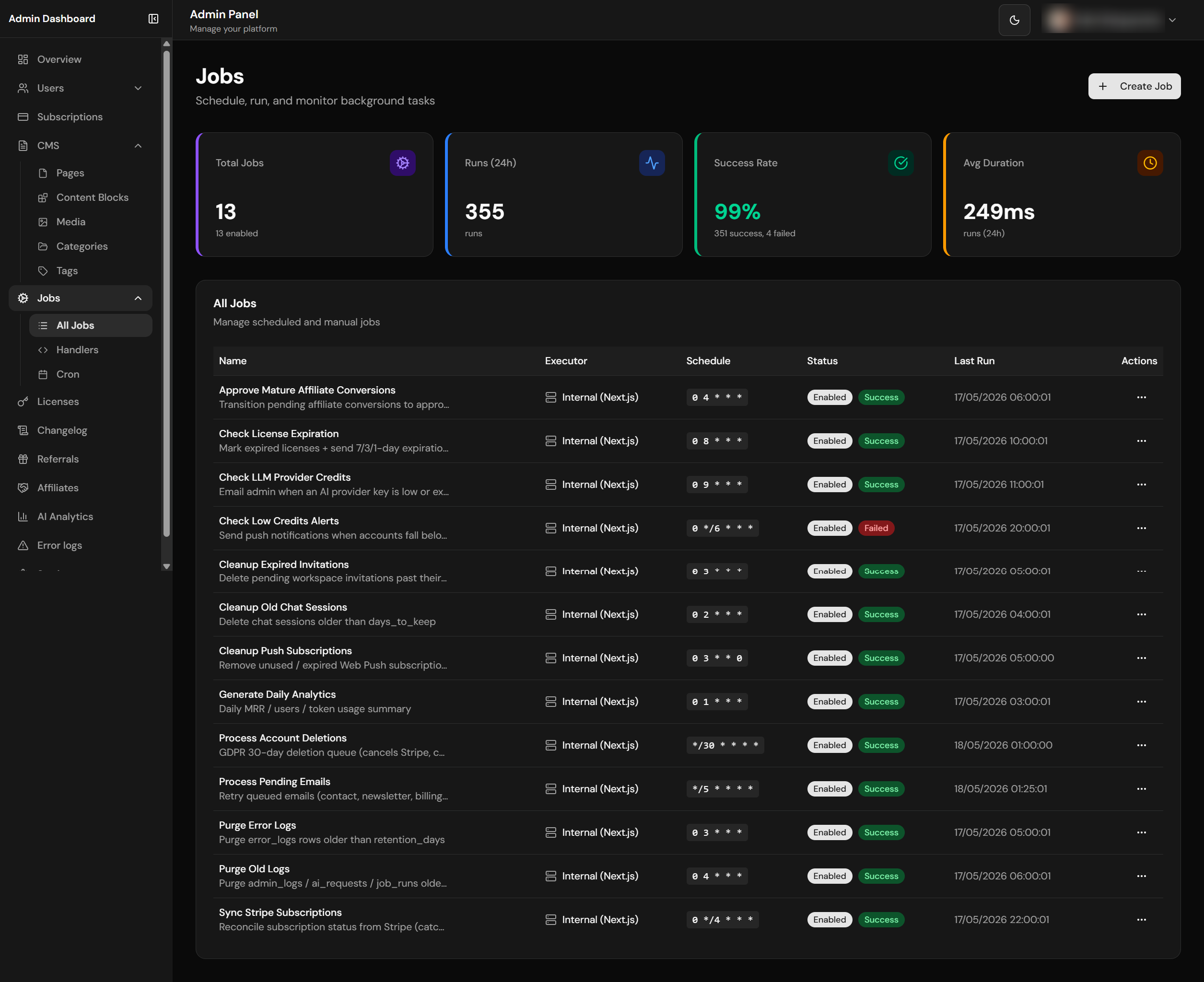
Jobs list with run history and status
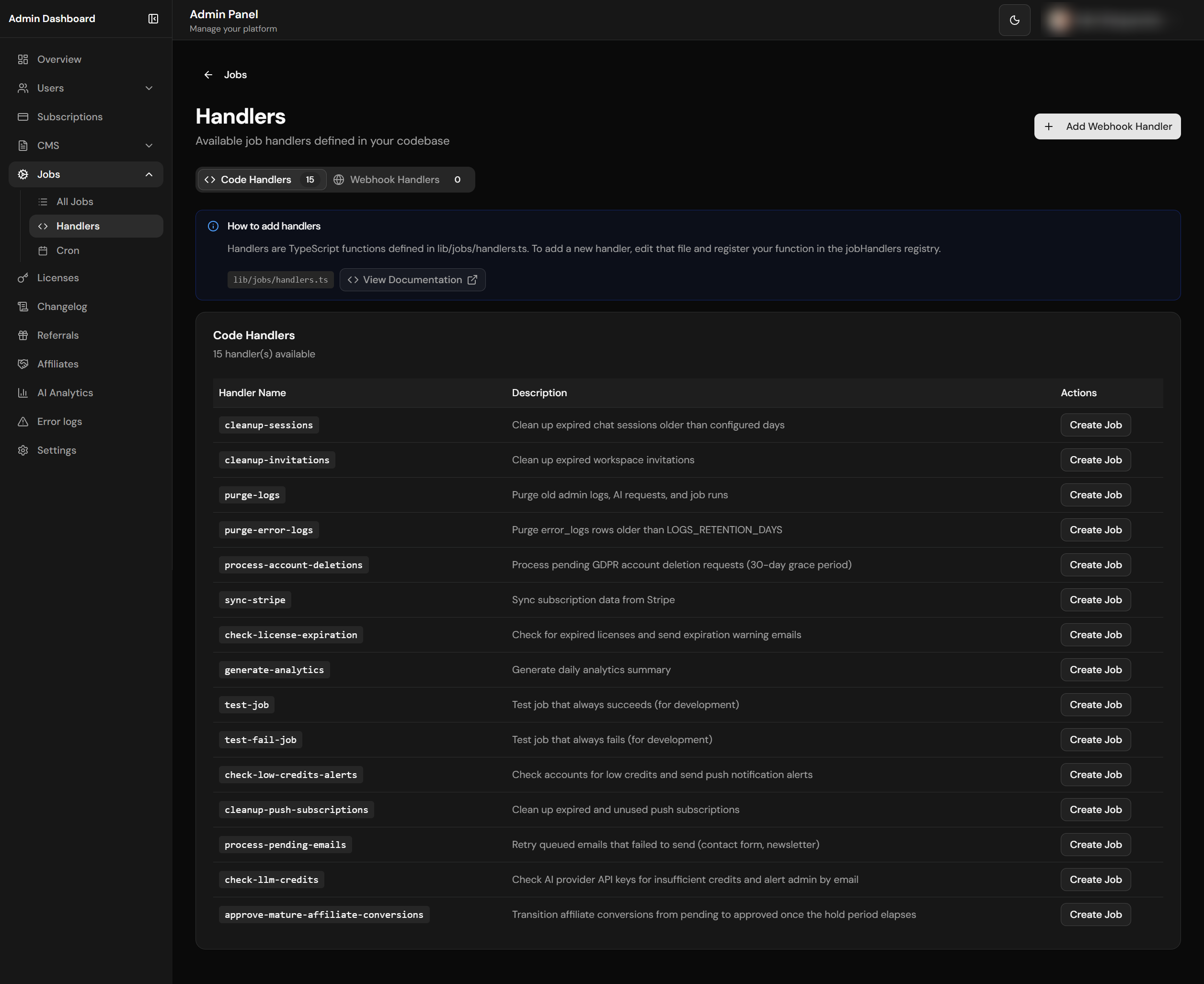
Code and webhook handlers management
Cron Scheduling
Schedule jobs with standard cron expressions.
Code Handlers
TypeScript handlers with full access to your codebase.
Webhook Handlers
Call external URLs with authentication support.
Run History
Complete execution logs with output and errors.
File Structure
lib/jobs/
├── handlers.ts           # Code-based job handlers registry
└── runner.ts             # Job execution engine

types/
└── jobs.ts               # TypeScript interfaces

app/
├── [locale]/(admin)/admin-dashboard/jobs/
│   ├── page.tsx          # Jobs list & stats
│   ├── new/page.tsx      # Create job
│   ├── [jobId]/page.tsx  # Job detail & runs
│   └── handlers/page.tsx # Handler management
└── api/
    ├── jobs/run/route.ts      # Job execution endpoint
    └── admin/jobs/
        ├── route.ts           # Jobs CRUD
        └── handlers/route.ts  # Handlers CRUD
TypeScript Types
Job-related types are defined in types/jobs.ts and include interfaces for job definitions, run records, handler configurations, and execution results. These types ensure type safety across the job creation, scheduling, and execution pipeline.
Built-in Handlers
13 production handlers + 2 dev-only test fixtures. The Gate column is the feature flag scripts/init-project.js reads to decide whether to seed the row at init time. Test fixtures are skipped by the seed step — admins can create them by hand from /admin-dashboard/jobs if needed.
| Handler | Description | Default Cron | Gate |
|---|---|---|---|
cleanup-sessions |
Delete chat sessions older than days_to_keep (30 by default) |
0 2 * * * |
always |
cleanup-invitations |
Remove expired pending workspace invitations | 0 3 * * * |
always |
cleanup-push-subscriptions |
Remove unused / expired Web Push subscriptions | 0 3 * * 0 |
always |
purge-logs |
Purge admin_logs, ai_requests, job_runs older than days_to_keep (90 by default) |
0 4 * * * |
always |
purge-error-logs |
Purge error_logs rows past LOGS_RETENTION_DAYS |
0 3 * * * |
LOGS_ENABLED=true |
sync-stripe |
Reconcile subscription status from Stripe, including missing local rows from missed create webhooks | 0 */4 * * * |
always |
check-license-expiration |
Mark expired licenses + send 7/3/1-day warning emails | 0 8 * * * |
billingModel ∈ {license, hybrid} |
process-account-deletions |
GDPR 30-day deletion queue (cancels Stripe, cascades data, removes auth users) | */30 * * * * |
always |
check-low-credits-alerts |
Push + bell alerts after complete bounded candidate/preference/cooldown checks | 0 */6 * * * |
always |
process-pending-emails |
Atomic email retry queue with exponential backoff (1m → 3m → 9m → 15m max) | */5 * * * * |
always |
check-llm-credits |
Email admin when an AI provider key is low or exhausted | 0 9 * * * |
always |
generate-analytics |
Previous UTC day AI requests, tokens, cost, new users, and chat sessions | 0 1 * * * |
always |
approve-mature-affiliate-conversions |
Reconcile canonical payment proofs and reversals, then approve eligible conversions | 0 4 * * * |
AFFILIATES_ENABLED=true |
purge-affiliate-clicks |
Delete raw affiliate click telemetry after its configured retention period | 30 4 * * * |
AFFILIATES_ENABLED=true |
test-job |
Always succeeds (dev fixture, not seeded by init) | — | dev only |
test-fail-job |
Always fails (dev fixture, not seeded by init) | — | dev only |
Low-credit alert preflight
check-low-credits-alerts prepares eligible Accounts before starting either Push or bell effects. The shared Prisma repository applies preferences, strict thresholds and both cooldown checks before ordering by balance/id and limiting the page in one actor-free worker transaction. Excluded Accounts do not occupy the first page. Only missing preference rows use defaults, and the bounded receipt validates every projected row before delivery starts.
config/low-credits.ts owns dbTimeoutMs=5000, maxAccountsPerRun=1000 and accountConcurrency=10, with positive-integer ceilings of 120000, 10000 and 100. Existing job options default_threshold and cooldown_hours retain defaults from aiConfig.lowCreditsAlert; max_accounts_per_run can override the page up to 10000. Values are validated without coercion or clamping. Thresholds retain SQL's signed int32 range; cooldown hours must be finite and nonnegative with a valid computed date. The former query-batch and history-row settings are removed. No new environment variable is required.
Install the selected complete composition before deploying the worker. Sources and manifest are the sole DDL authority for fresh installations, and init verifies the worker capability and indexes. No preference/history rows leave PostgreSQL. The database request, Push request and response body consume their configured deadlines and parent cancellation; late success is rejected. Indexes support Account order and exact cooldown probes, but the output limit does not bound all rows scanned.
Existing cooldown rules are unchanged: the exact current-owner/Account pair matters, failed Push attempts still count, and matching bell alerts count whether read or unread. Prior-owner history does not suppress a successor. The lower time boundary is inclusive; matching future-dated rows are not newly excluded. checked now counts only selected eligible Accounts, not opt-outs or cooldown exclusions. Each of the ten Account slots stays occupied until both channels settle, even if one throws; confirmed success from the other channel remains counted. Parent cancellation stops later batches, but does not retract completed sends or cancel an already-started bell write.
The selection snapshot is not a lock or durable claim: overlapping runs can still duplicate alerts and state can change before effects. Cooldown history lets later Accounts enter the page, but repeatedly failing candidates without any history can still monopolize it. There is no cross-channel outbox or atomic erasure-to-send fence. The focused local boundary verifies bounded Prisma reads and selection after cooldown without calling a delivery provider.
Email Queue Claiming
Workspace invitation creation and resend commit a durable email intent in
the same transaction as the invitation. Keep process-pending-emails
enabled: the Members page shows queued, sent or failed delivery, and its
resend action retries a terminal failure. Repeated resends while pending
or processing coalesce into one intent. The outbox stores an invitation
reference and locale, never its bearer token; the worker resolves that
token only for a still-pending, unexpired invitation. Accepted, revoked
and expired invitations are skipped. The shared per-recipient delivery
quota applies across organizations and retries.
process-pending-emails claims work through the shared Prisma
queue repository before sending. The worker transaction uses
FOR UPDATE SKIP LOCKED, moves rows to
processing, increments attempts, and returns a
bounded batch so overlapping workers cannot own the same active lease.
Rows stuck in processing for more than 15 minutes are eligible
for a later retry.
Delivery is at least once: a crash after provider acceptance but before
durable settlement can cause a duplicate message on retry.
Handler-sent customer emails are locale-parameterized. Billing notification
subjects use email.billingNotif.*, license warnings use
email.licenseExpiration.*, and organization deletion notices
use email.orgDeleted.*. Job handlers pass a locale from the
payload, owner profile, or configured default locale instead of hardcoding
a language inside the handler.
Init-Time Seeding
pnpm run init seeds the jobs table with the production handlers above based on the answers given to the wizard:
- Always-on handlers are inserted unconditionally.
- The initialization wizard feature-gates optional jobs. Affiliate integrity migrations also upsert maturation and click-retention jobs for existing installations; once data exists, those financial/privacy obligations continue even while
AFFILIATES_ENABLED=false. - All inserts use
INSERT … ON CONFLICT (name) DO NOTHING, so re-running the wizard never overwrites admin-tuned cron expressions orconfigpayloads. - For either native provider, the
AFTER INSERTtrigger onpublic.jobscallssync_pg_cron_job()per row.supabase_pg_cronschedules an authenticated HTTP call;postgres_pg_cronschedules a fixed, secret-free SQL enqueue command. - After the seed, the wizard re-syncs all enabled rows. This covers pre-existing schedules and, for the Supabase HTTP topology, URL or Bearer-token drift.
If a feature is enabled after init (e.g. flipping AFFILIATES_ENABLED=true later), either re-run pnpm run init or create the missing job from /admin-dashboard/jobs — function names must match the registry keys above exactly.
Creating a Code Handler
To create a new code-based handler, add a function to lib/jobs/handlers.ts that accepts a job configuration object and returns a result. Register the handler in the handlers map with a unique key. Your handler can access the database, call external APIs, send emails, or perform any server-side operation. The handler receives the job's metadata (including custom config JSON) and should return a success/error status with optional output data.
Admin Email Notifications
The boilerplate includes a centralized admin notification system that alerts the super-admin by email when critical events occur. Notifications are queued via the email retry system for reliable delivery.
| Notification | Trigger | Description |
|---|---|---|
| LLM Credit Alert (Real-time) | AI streaming request fails with 402/429 | Immediate email when a provider returns insufficient credits or quota errors during user AI requests |
| LLM Credit Alert (Scheduled) | check-llm-credits job handler |
Proactive health check through the centralized AI boundary: OpenRouter once in gateway mode, or each configured direct OpenAI/Anthropic/Google key |
| Job Failure Alert | Job fails with notify_on_failure enabled |
Email with job name, error details, run ID, and duration when a flagged job fails |
Use sendAdminNotification() from lib/email/admin-notifications.ts to send custom admin alerts:
import { sendAdminNotification } from '@/lib/email/admin-notifications'

await sendAdminNotification({
  subject: '[Alert] Something important',
  title: 'Alert Title',
  body: 'Description of what happened.',
  details: {
    'Key': 'Value',
    'Another Key': 'Another value',
  },
  tags: ['admin-notification', 'custom'],
})
Cron Expressions
| Expression | Description | Use Case |
|---|---|---|
*/5 * * * * |
Every 5 minutes | Health checks, quick syncs |
0 * * * * |
Every hour | Cache refresh, metrics |
0 3 * * * |
Daily at 3am | Cleanup, reports |
0 0 * * 0 |
Weekly on Sunday | Weekly digest, backups |
0 0 1 * * |
Monthly on 1st | Monthly reports, billing |
Job Execution API
The job execution endpoint at /api/jobs/run accepts job triggers from cron schedules, manual admin actions, or external webhooks. Cron/webhook calls authenticate with Authorization: Bearer JOBS_SECRET_KEY using constant-time comparison, webhook rate limiting, and bounded JSON parsing. Manual dashboard runs authenticate as an admin session and additionally require Origin/CSRF validation plus the 30/min/route admin-write limit. After auth, the route loads the job definition, resolves the handler (code-based or webhook), and executes it with timeout protection and error handling.
Webhook Handlers
Webhook handlers call external URLs instead of running local code. Useful for integrating with external services or serverless functions.
Handler create/update APIs validate and sanitize all editable fields, require
http or https URLs, reject localhost/private
network targets, and never return stored webhook auth secrets from list or
detail responses.
Job Runner
The job runner in lib/jobs/runner.ts manages the execution lifecycle: it claims or creates a job_runs record, invokes the handler (either a local function from the handlers registry or an HTTP request to a webhook URL), captures the output or error, records the execution duration, and updates the run status. Failed jobs can be configured for automatic retry with configurable delays. With postgres_pg_cron, run pnpm jobs:worker as a supervised process so the fixed SQL cron enqueue is followed by TypeScript handler execution.
Database Schema
The jobs system uses jobs (definitions with name, cron expression, handler, config, and enabled status), job_runs (durable leased execution history with retry and terminal state), and job_handlers (bounded webhook handler definitions). The email worker claims pending_emails through the same shared Prisma worker boundary. Supabase defaults to supabase_pg_cron; Neon defaults to postgres_pg_cron; both retain external_runner as an explicit fallback.
How Jobs Work - Overview
Job Execution Flow
Jobs are stored in the database with their cron schedules. With either native provider, creating, updating, or deleting a job automatically configures pg_cron through database triggers. No manual SQL is needed.
Execution Flow Diagram
┌─────────────────────────────────────────────────────────────────────┐
│                        ADMIN DASHBOARD                               │
│                    /admin-dashboard/jobs                             │
│  ┌─────────────┐  ┌─────────────┐  ┌─────────────┐                  │
│  │ Create Job  │  │ Update Job  │  │ Delete Job  │                  │
│  └──────┬──────┘  └──────┬──────┘  └──────┬──────┘                  │
└─────────┼────────────────┼────────────────┼─────────────────────────┘
          │                │                │
          ▼                ▼                ▼
┌─────────────────────────────────────────────────────────────────────┐
│                     DATABASE TRIGGER                                 │
│               trigger_sync_pg_cron()                                 │
│                                                                      │
│   • On INSERT/UPDATE: Schedule job in pg_cron                        │
│   • On DELETE: Unschedule job from pg_cron                           │
│   • Checks: is_enabled + cron_expression                             │
└──────────────────────────────┬──────────────────────────────────────┘
                               │
                               ▼
┌─────────────────────────────────────────────────────────────────────┐
│                         pg_cron                                      │
│              PostgreSQL Cron Scheduler                               │
└───────────────┬──────────────────────────────────┬───────────────────┘
                │ supabase_pg_cron                 │ postgres_pg_cron
                │ HTTP POST (pg_net)               │ fixed SQL enqueue
                ▼                                  ▼
┌───────────────────────────────┐   ┌──────────────────────────────────┐
│        /api/jobs/run          │   │ pending job_runs occurrence      │
│ Bearer JOBS_SECRET_KEY        │   │ no URL, secret, pg_net or Vault  │
└───────────────┬───────────────┘   └────────────────┬─────────────────┘
                │                                    │ pnpm jobs:worker
                └──────────────────┬─────────────────┘
                                   ▼
┌─────────────────────────────────────────────────────────────────────┐
│                      JOB RUNNER                                      │
│                  lib/jobs/runner.ts                                  │
│                                                                      │
│   1. Find job by ID or name                                          │
│   2. Check if job is enabled                                         │
│   3. Create or claim job_runs record                                 │
│   4. Execute handler (code or webhook)                               │
│   5. Update job_runs with result                                     │
│   6. Update job statistics                                           │
└──────────────────────────────┬──────────────────────────────────────┘
                               │
              ┌────────────────┴────────────────┐
              ▼                                 ▼
┌─────────────────────────┐       ┌─────────────────────────┐
│     CODE HANDLER        │       │    WEBHOOK HANDLER      │
│  lib/jobs/handlers.ts   │       │   (External URL)        │
│                         │       │                         │
│  • cleanup-sessions     │       │  • Your API endpoint    │
│  • purge-logs           │       │  • Serverless function  │
│  • sync-stripe          │       │  • External service     │
│  • generate-analytics   │       │                         │
└─────────────────────────┘       └─────────────────────────┘
Automatic pg_cron Scheduling
The boilerplate automatically manages pg_cron entries when you create, update, or delete jobs. You don't need to write any SQL - just use the admin dashboard!
| Action | What Happens |
|---|---|
| Create job with cron + enabled | pg_cron entry automatically created |
| Update cron expression | Old pg_cron entry removed, new one created |
| Disable job (is_enabled = false) | pg_cron entry removed (job stops running) |
| Enable job (is_enabled = true) | pg_cron entry created (job starts running) |
| Delete job | pg_cron entry automatically removed |
Cron Admin Dashboard /admin-dashboard/jobs/cron
A live operations view of every entry in the Postgres cron.job table — sibling to the regular Jobs page,
but scoped to raw pg_cron state rather than the public.jobs definitions.
Use it to monitor what pg_cron actually has scheduled, pause/resume entries without deleting their jobs row,
and clean up orphans left behind after job deletes or scheduler reconfiguration.
Authoring stays in /admin-dashboard/jobs
The cron page intentionally cannot create entries or edit cron expressions in place.
The source of truth is the public.jobs table — adding/editing a row triggers sync_pg_cron_job
which writes the cron entry for you. Letting the cron page create entries directly would bypass that and produce orphans.
What you can do on the page
| Action | Effect |
|---|---|
| Toggle active | Flips cron.job.active. Reversible — pauses/resumes the schedule without unscheduling. |
| Unschedule | Calls cron.unschedule(jobid) and clears jobs.pg_cron_job_id so the next sync_pg_cron_job() takes the "schedule fresh" branch. Gated by recent-auth. |
| Purge orphans | Bulk-unschedules provider-owned entries whose HTTP or fixed SQL command no longer has a matching public.jobs row. Gated by recent-auth. |
| Stats | Counts (total / active / orphans) plus 24h aggregate from cron.job_run_details (runs and success rate). |
Security model
- Page + API gated by
apiSecurity.admin()(admin role + method/route-scoped limits + CSRF; sensitive job mutations retain 5/min/route). - Destructive actions (unschedule, purge-orphans) require recent auth via
appConfig.security.requireRecentAuthForAdminEscalationMinutes. A session-hijacked admin cannot tear down platform infrastructure (GDPR job, email queue, log purge) in one POST without re-authenticating. - Successful mutations and audit commit together. SQL writes the canonical administrator, fixed action and safe IDs/counts to
admin_logs. An audit failure rolls back native changes. Missing targets do not create audit rows; successful empty purges do. - Every SQL command is masked in full. The common Prisma snapshot returns
[REDACTED]for application and native jobs alike. - Orphan filters are provider-specific and anchored. Supabase recognizes only its
net.http_postjob endpoint commands; PostgreSQL/Neon recognizes only the fixed private enqueue command. Unrelated extension or user-defined cron entries are never classified as application orphans.
Shared database commands
Private capabilities execute through shared Prisma after canonical administrator checks. One read-only snapshot returns the list and statistics. Toggle, unschedule and purge use an atomic actor transaction with a five-second deadline, fixed native operations and audit. The runtime cannot access raw cron tables or assume a privileged owner role.
config/cron-admin.ts bounds reads and purge to 200 native entries. Purge validates every candidate before modifying it; a native failure rolls back the whole batch. Successful purge returns { purged, failed: 0 }. Single-entry operations reject ambiguous application references, and unschedule clears a reference only after native removal succeeds.
Missing native capabilities and targets owned by an unavailable native operator return an unsupported outcome. Reads require execution history; a 24-hour filter does not guarantee a bounded scan when the native table has no time index. Managed-provider support and realistic history performance require separate certification.
Prerequisites Setup
Automatic Setup (Recommended)
Run pnpm run init - the initialization wizard automatically:
- Installs
pg_cronfor either native provider;supabase_pg_cronadditionally usespg_netand Vault - For
supabase_pg_cronorexternal_runner, generatesJOBS_SECRET_KEYand rejects placeholder or short values - For
supabase_pg_cron, stores the key in Supabase Vault and configures the Jobs API URL - For
postgres_pg_cron, installs fixed, secret-free SQL enqueue commands without Vault,pg_net, or a Jobs API URL - Re-syncs existing jobs using the selected provider contract; start
pnpm jobs:workerforpostgres_pg_cron
Supabase Boot-time URL Sync (automatic)
With supabase_pg_cron, instrumentation.ts calls lib/jobs/sync-cron-url.ts on every server boot. It reads app_settings.jobs_api_url, compares it to ${appConfig.url}/api/jobs/run, and if they drift it upserts the row and re-runs sync_pg_cron_job(id) for every enabled job in parallel. postgres_pg_cron skips URL reconciliation because its command performs no HTTP request.
Net effect: change NEXT_PUBLIC_APP_URL, redeploy — your cron entries pick up the new URL automatically. No manual SQL, no admin-settings tweak.
- Skipped when
appConfig.urlislocalhost/127.0.0.1— local dev never overwrites a hosted DB's value. - Fast-paths when the URL already matches (one cheap
SELECT, no writes). Steady-state cost ≈ zero. - Fire-and-forget — failures log to
/admin-dashboard/logswith categoryjobsand eventcron_url_sync_*; never blocks server startup. - Vault is deliberately untouched — rotating an active secret on every boot would 401 in-flight cron calls. Use
pnpm run initwhen you need to rotateJOBS_SECRET_KEY.
If you need to set up the Supabase HTTP scheduler manually, follow these steps. For PostgreSQL/Neon, select postgres_pg_cron, install pg_cron through the canonical composition, and supervise pnpm jobs:worker; do not add pg_net, Vault, a Jobs API URL, or a scheduler Bearer secret.
PostgreSQL/Neon native prerequisites
A self-hosted PostgreSQL server must have the pg_cron binary available, load it through shared_preload_libraries=pg_cron, set cron.database_name to the target database, and restart before the schema is installed. The application worker must run as a supervised process after installation.
Managed Neon owns its preload and server settings; do not attempt to change them through the boilerplate. The database catalogue must expose pg_cron. Initialization fails closed when that native contract is unavailable, in which case select external_runner. This topology never requires pg_net or Supabase Vault.
Step 1: Enable Extensions
For supabase_pg_cron, enable the pg_cron and pg_net extensions in your Supabase project. Go to Database → Extensions in the Supabase Dashboard and enable both. These allow scheduled tasks and HTTP requests from within PostgreSQL.
Step 2: Generate and Store Secret Key
Generate a secure random string for JOBS_SECRET_KEY. This key authenticates HTTP job execution requests. Store it securely in Supabase Vault for supabase_pg_cron. It is not part of the postgres_pg_cron scheduler path.
Step 3: Add to Environment
Add the same JOBS_SECRET_KEY value to your .env.local file so the Next.js application can authenticate incoming HTTP execution requests. For supabase_pg_cron, it must match the value stored in Supabase Vault.
Step 4: Configure Jobs API URL
For supabase_pg_cron, go to Admin Dashboard → Settings and set the Jobs API URL to your deployed origin plus the job endpoint:
# Production — must be a publicly reachable URL (pg_cron runs on Supabase)
https://your-domain.com/api/jobs/run
CRITICAL: localhost Does NOT Work!
The supabase_pg_cron HTTP command runs on Supabase's servers, not your local machine. It cannot reach
localhost:3777 or 127.0.0.1. Even though pg_cron will show "succeeded",
the HTTP request never reaches your local server.
Local Development Options
For testing Supabase HTTP-scheduled jobs during local development, use manual execution or a public tunnel. With postgres_pg_cron, keep pnpm jobs:worker running locally; no tunnel is needed because pg_cron only inserts the durable occurrence.
Option 1: Manual Testing (Recommended)
Use the "Run Now" button in the job detail page. This executes the job directly from your browser (bypasses pg_cron) and works perfectly with localhost.
Or use curl (the endpoint takes a Bearer token OR an admin session):
curl -X POST http://localhost:3777/api/jobs/run \
  -H "Authorization: Bearer $JOBS_SECRET_KEY" \
  -H "Content-Type: application/json" \
  -d '{ "job_id": "<uuid-from-admin-dashboard-jobs>" }'
Option 2: Use ngrok (For full pg_cron testing)
Expose your local server to the internet with ngrok, then set the public URL as the Jobs API URL in Admin → Settings:
ngrok http 3777
# Copy the https://<id>.ngrok-free.app URL, then set
# Admin → Settings → Jobs API URL = https://<id>.ngrok-free.app/api/jobs/run
Additional Schema (pg_cron tracking)
The jobs system adds a provider-specific trigger function that automatically syncs job definitions with pg_cron whenever a job is created, updated, or deleted. Supabase entries dispatch authenticated HTTP; PostgreSQL/Neon entries contain only the fixed private enqueue call.
Verification
After setting up, verify everything works:
- In the selected database SQL console, run
SELECT jobname, schedule, active FROM cron.job;— your enabled native-scheduler jobs should be listed with their cron expressions. On PostgreSQL/Neon, confirm commands contain the fixed enqueue call and no URL or credential. - From
/admin-dashboard/jobs, click Run Now on a safe job (e.g.cleanup-sessions) and confirm a new row appears injob_runswithstatus = 'success'. - Check
SELECT * FROM job_runs ORDER BY created_at DESC LIMIT 5;for recent executions and durations. - If
LOGS_ENABLED=true, watch/admin-dashboard/logsfor anyjobs-category errors after the first scheduled tick.
Troubleshooting
| Issue | Solution |
|---|---|
| Job created but not running | Check is_enabled = true and a cron expression is set. For supabase_pg_cron or external_runner, also verify the Jobs API URL and Bearer configuration. For postgres_pg_cron, verify pnpm jobs:worker is running and can claim pending occurrences. |
| pg_cron entry not created | For supabase_pg_cron, verify jobs_api_url in app_settings is not empty and inspect cron_url_sync_* logs. For postgres_pg_cron, the URL is intentionally unused; verify the extension is installed for the selected composition and inspect the provider-owned fixed SQL command. |
| cron.job.command points to localhost or stale URL | The boot-time sync (lib/jobs/sync-cron-url.ts) re-syncs on URL drift, but it is skipped when appConfig.url is itself localhost. Set NEXT_PUBLIC_APP_URL to your public URL and redeploy. To force-sync immediately, run SELECT sync_pg_cron_job(id) FROM jobs WHERE is_enabled = true; in the Supabase SQL editor. |
| HTTP 401 Unauthorized | Check jobs_secret_key exists in Vault and matches JOBS_SECRET_KEY env. Common cause: .env.local still has the placeholder your-secret-key-here (or a suffixed variant like your-secret-key-here-test-2014-test) — the wizard now rejects these, so re-run pnpm run init to rotate Vault and the env value together. Note: the boot-time sync deliberately does not rotate Vault. |
HTTP 401 + secret looks right, query string in net._http_response contains ?Authorization=Bearer%20… |
The Bearer is being sent as a URL query parameter, not a header.
On pg_net >= 0.7 the third positional argument of net.http_post() is params, not headers.
If schedule_pg_cron_job() calls net.http_post(url, body, headers_jsonb) positionally,
the headers JSONB is sent as URL params and JOBS_SECRET_KEY ends up in your access logs.
Fix the scheduler source under database/overlays/integrations/scheduler/ to use named args
(headers := …) which is version-agnostic. After applying, rotate JOBS_SECRET_KEY in both Vault and your hosting env
because the old value is in CDN/Vercel access logs, then re-run SELECT sync_pg_cron_job(id) FROM jobs WHERE is_enabled = true.
|
| Orphan cron entries left behind after deleting jobs | On either native scheduler composition, open /admin-dashboard/jobs/cron and click Purge orphans (recent-auth required). The application capability performs bounded cleanup using the selected provider's anchored command classifier. The external runner has no native cron rows to purge. |
| Jobs running but failing | Check job_runs table for error messages, verify handler exists |
pg_net errors |
This applies only to supabase_pg_cron. Verify pg_net is enabled in Supabase. Do not add it to postgres_pg_cron; that provider performs no HTTP dispatch. |
Quick Start Example
Here's how to create a working scheduled job in 3 steps:
1. Go to Admin Dashboard → Jobs → New Job
Create a job with these settings:
- Name:
daily-cleanup - Handler:
cleanup-sessions - Cron:
0 3 * * *(daily at 3am) - Enabled: Yes
2. Verify pg_cron Entry
After creating or updating a job, the database trigger automatically syncs it with pg_cron. Query cron.job in the selected database console to confirm the schedule, provider-owned command, and active status. PostgreSQL/Neon commands must be fixed SQL enqueue calls with no URL or secret.
3. Test Manually (Optional)
Click "Run Now" in the job detail page or call the API:
Environment Variables
Set JOB_SCHEDULER_PROVIDER to supabase_pg_cron, postgres_pg_cron, or external_runner for a compatible database composition. Set JOBS_SECRET_KEY to a secure random string when Supabase cron, an external scheduler, or an operator calls the HTTP execution endpoint. postgres_pg_cron does not use that secret; it requires a supervised pnpm jobs:worker process. For webhook-based handlers, configure the handler's own authentication method (Bearer token, basic auth, API key, or custom header) in the admin dashboard.