The boilerplate supports multiple authentication methods:
Personal login/logout history and access-event writes use shared Prisma with the verified application actor. History remains bounded to the latest 20 events, ordered by timestamp and ID. Administrative profile events distinguish the acting administrator from the target user. Session revocation still finishes through the selected Auth provider before its separate database audit; an audit failure does not reverse a successful revocation. A rejected OAuth duplicate-account session emits an unattributed operational diagnostic instead of a successful login against an email-matched user. Database/Auth certification remains local_only and gated by the compatibility matrix and its composition-specific evidence.
OAuth rejection and duplicate-account cleanup share the guarded Auth-user deletion boundary. Only an identity proven newly created during its signed attempt is eligible; duplicate cleanup also retains the verified-email and single-identity checks and runs only after the application merge commits. A cleanup failure never recreates the merged-away application identity. The configured ten-second Auth-erasure deadline covers lookup, deletion and absence confirmation together; ambiguous failures require inspection rather than an automatic retry. This is not a durable cleanup workflow or general session revocation.
Workspace bootstrap and invitation domain helpers are internal server-only functions. Import ensureWorkspaceForUser from core/accounts/workspace-bootstrap.ts, creation from core/accounts/create-invitation.ts, and acceptance/resend from core/accounts/invitations.ts; revocation lives in core/accounts/revoke-invitation.ts. Callers supply the authenticated application actor. Browser clients use the authenticated inviteMember Server Action for creation and the protected invitation APIs for acceptance, resend and revocation. These mutations use shared Prisma transactions with canonical identity and Account checks. Public preview uses a bounded read-only Prisma lookup; the success page checks membership before selecting the workspace. Fresh installations require the matching SQL capabilities and runtime provisioning.
Authenticated API wrappers preserve verified provider session-cookie refreshes, including when a later authorization check denies the request. They return 503 AUTH_CURRENT_SESSION_UNAVAILABLE for temporary Auth failures without publishing tentative cookie changes. Logout and recovery remain reachable during a claims-provider incident; their own authentication work can still fail. Responses carrying committed Auth-cookie changes use Cache-Control: private, no-store, and later logout or finalization cleanup takes precedence over the earlier refresh.
Live-session listing, single-device revocation, all-other-device revocation and local logout pass through one server-only Auth-provider port. It validates the configured provider, issuer and native subject before cookie or provider I/O, validates the reduced session DTO and bounds the real request and response body to ten seconds. Supabase Auth and Better Auth have separate adapters; neither exposes its native user or session model to product domains. The resolved appUserId remains the sole application authority and audit identity. Single and collective remote revocation require destructive step-up. Provider failures expose stable application codes without native rows or error text, and no mutation is retried automatically.
Proxy applies the same distinction to its explicit current-user and claims checks: temporary failures return a non-cacheable 503 without a login redirect or session-cookie deletion. Verified refreshes propagate to downstream requests and redirects, including rotations during later profile queries. Invalid sessions keep the existing login or MFA flow; rejected finalization clears incomplete session cookies. Public pages and callbacks do not create a Proxy Auth client, and maintenance takes precedence. Independent Auth clients and implicit Auth failures inside profile queries are not covered by this availability boundary.
API routes declaring stepUp reuse the verified request session for recent-auth and assurance checks. Required claims are classified before refreshed cookies are published; temporary failures return 503 AUTH_CURRENT_SESSION_UNAVAILABLE without changing the session. Invalid step-up evidence returns 401, while valid sessions needing stronger authentication keep the existing 403 challenges. Factor and enrollment checks still follow rate limits and authorization. Sensitive admin route handlers declare stepUp: 'adminEscalation' on the wrapper, before route parsing or feature checks; unexpected gate failures are logged and return a redacted 500. No configuration or migration is required.
Step-up assurance is normalized by the pure projectSessionAssurance() helper after the request facade verifies the current session; Proxy reads the same facade's assurance level directly. The internal step-up gate requires the matching prepared proof and never falls back to a second current-user or claims read. Missing or invalid proof returns 401 even when minutes: 0 disables freshness checks. The unused getSessionAssurance(), requireRecentAuth() and Proxy assurance wrapper have been removed. Existing routes already use declarative stepUp; a future Server Action or other non-wrapper entry needs its own reviewed session and cookie integration, not a direct call to the internal gate. Release approval still requires complete composition-specific local evidence through pnpm run qa:release; application startup validates runtime configuration separately.
Magic-link and typed-OTP callbacks enter a provider-neutral email-verification boundary; each selected adapter owns its native verification call, and only the Supabase adapter calls verifyOtp. The adapter validates the returned principal and session together, then verifies the exact native session proof from that response. The verified subject must match the issued provider subject and carry a usable session ID; raw tokens, provider sessions and native users never reach the application finalizer or logs. Stable expired credentials remain distinct from temporary, rate-limited, malformed or contradictory provider results. Ambiguous failures reject any possibly issued session through a fresh adapter; a known invalid typed OTP preserves the browser-bound retry attempt and any prior session. Passkey completion continues to reuse the session ID already verified by its pending-auth wrapper.
OAuth completion uses the same architecture through a dedicated code-exchange port. The signed browser attempt is verified before provider I/O, and each selected adapter owns its native exchange; only the Supabase adapter calls exchangeCodeForSession. It binds the returned principal and exact session proof, then emits a frozen receipt without a native user, session, token, identity object or provider error. Provider-email proof additionally requires the configured upstream provider, the matching native identity and the same normalized primary email; absent proof still permits authentication but cannot authorize an email-based duplicate merge or automatic guest-purchase claim. A ten-second deadline aborts the real request and a one-use code is never retried. Stable invalid credentials clear only the terminal attempt, while ambiguous or post-receipt failures reject the possibly issued session through a fresh adapter and deadline.
OAuth initiation in the login and registration forms also crosses a browser provider boundary. The signed login or consent carrier is persisted first, then the selected Supabase Auth or Better Auth adapter creates its authorize URL with automatic navigation disabled. The application validates the exact configured provider, same-origin callback and canonical provider endpoint before navigating once. Duplicate clicks are blocked synchronously, an unmounted form cancels the pending launch, and failures clear the carrier while showing only the localized generic error. Executability does not bypass the composition-specific local certification gate.
The shared email finalizer receives only the frozen verification receipt: provider coordinates, verified email evidence, session id and a nullable verified-factor projection. It resolves and activates the canonical application identity before business and audit work; the activation transaction revalidates the profile, personal Account, owner membership, consent evidence and lifecycle status. It uses the authoritative MFA fallback when the provider omitted factor state. Every unsuccessful post-verification path rejects the issued session before returning a safe result.
The magic-link, OAuth and typed-OTP HTTP boundaries now stage session, finalization, consent and PKCE cookies together until the application returns an explicit authentication success. Only the final response publishes the accepted values, with Cache-Control: private, no-store; tentative values are never written to Next's mutable cookie store. A rejected issued session produces deletion cookies that override later refresh writes, while an invalid OTP before a session is issued keeps the previous session and retry carrier. An unexpected transport or serialization failure clears all observed authentication cookies, including a previous session. This controls local cookie publication, not atomic browser delivery or rollback of provider and database work. Passkey completion, logout and Server Components keep their existing cookie handling. No new configuration is required.
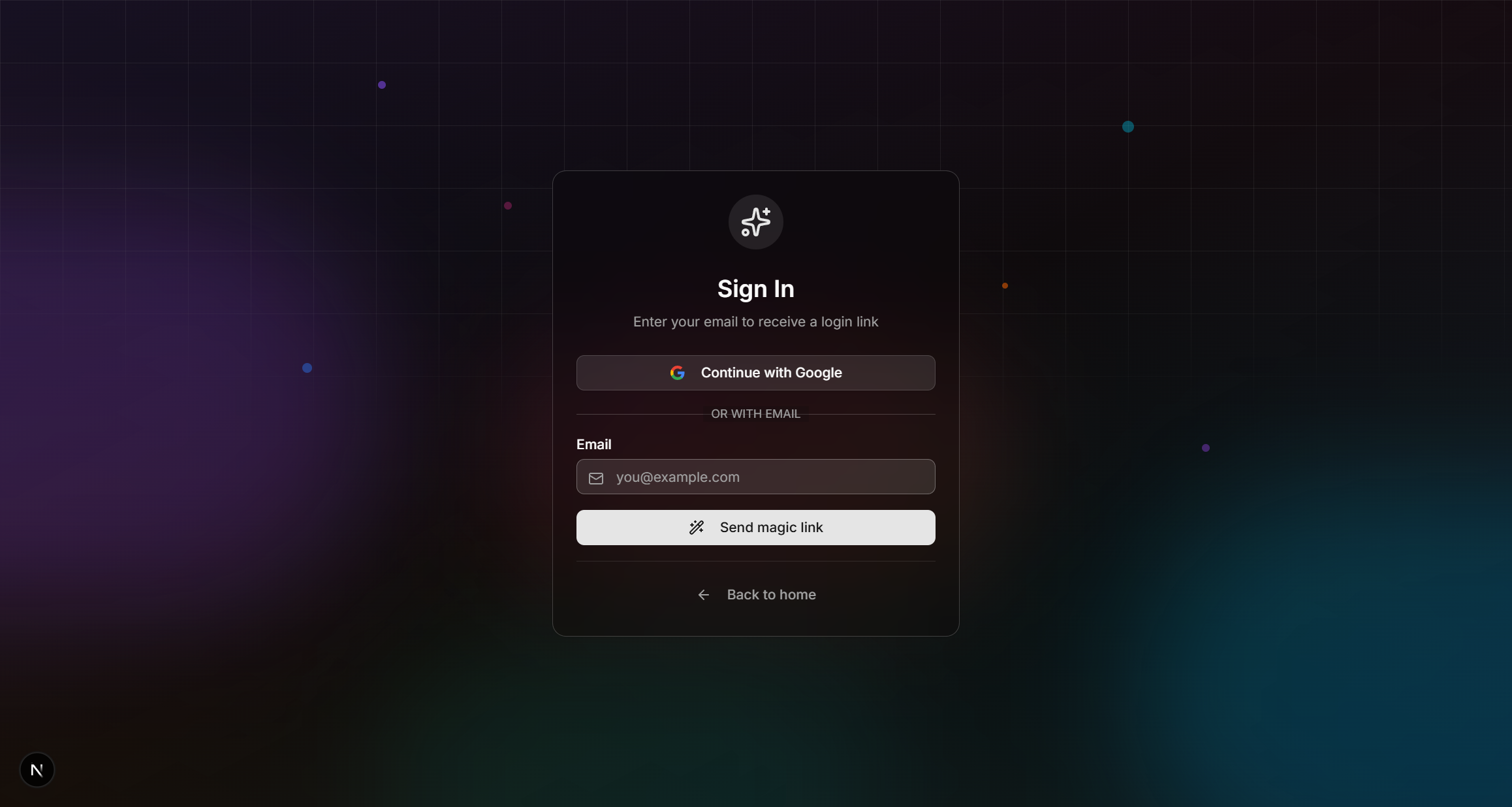
Login page with magic link and OAuth providers
Magic Links + OTP Code
A single sign-in request produces two equivalent paths — a clickable link and a one-time code (default 6 digits, configurable 6–10 via OTP_LENGTH) — so users who request on one device (desktop) and open the email on another (mobile) never lose the session. The email body shows the code prominently above the button; the success screen in the original tab includes an OTP input so users can type the code back without context-switching.
-
User enters their email
On the login page, the user submits their email address. The login button reads "Continue with email" (i18n key
auth.login.sendMagicLink) — intentionally jargon-free. -
API sends link and code
The
/api/auth/magic-linkendpoint delegates issuance to the server-onlycore/auth/provider-magic-link.tsboundary. It validates the configured Auth provider and issuer, native recipient and numeric OTP length, then returns only a token hash, code and verification type to delivery. Delivery builds the application callback with the signed attempt correlation; the nativeaction_linkis never forwarded. The active email provider sends the existing localized template with both a button and an OTP code. -
Success screen on the original tab
The form switches to a "Check your inbox" view that shows the email address the link was sent to, an OTP input (numeric,
autoComplete="one-time-code", dynamicmaxLength/patternbased on OTP_LENGTH), a "Wrong email?" back-button, a spam-folder reminder, and a "Resend" button with a 30-second cooldown countdown. -
Path A — user clicks the link
The link points to
/[locale]/callback?token_hash=…&type=magiclink. The callback validates the OTP type and the signed browser-bound attempt before provider I/O, then passes the opaque token hash to the email-verification port. Only a reduced verified receipt enters consent, prelaunch, account, MFA and exact-session finalization gates before the sanitized redirect is published. -
Path B — user types the code
The OTP input submits to
POST /api/auth/verify-otp(apiSecurity.public()+strictrate limit). The endpoint Zod-validates{ email, token, locale, redirectTo }againstappConfig.auth.otpLength, verifies the signed attempt, and invokes the same provider port. A stable expired credential returns the generic "Invalid or expired code" without confirming whether the email exists. Temporary or ambiguous provider failures return a redacted 503 after fresh cleanup. Success mirrors the callback's application gates and returns only the resolved redirect target; the client performs a full reload so middleware reads the accepted session cookie. -
Cross-tab auto-redirect
While the success screen is open, the client invokes the provider-neutral browser-session observer every 4 seconds (paused via
document.visibilityStatewhen the tab is backgrounded). Each observation has a 3.5-second aborting deadline and observations never overlap. Only a strictly validated authenticated result redirects; anonymous, malformed and temporarily unavailable outcomes do not. If the user clicks the email link in a different tab, that tab's callback route sets the shared origin cookie, so the original tab's next successful observation redirects. No service worker, broadcast channel or extra dependency is required.
authMagicLinkConfig.providerTimeoutMs in config/auth-magic-link.ts bounds one issuance attempt to ten seconds, including the response body. OTP_LENGTH must match the selected Auth provider; a missing or differently sized code fails delivery instead of sending a partially usable message. Login accepts only a magic-link credential; registration also accepts signup. The prelaunch, rate-limit and complete-terms gates remain in place. Issuance can create an unknown native user before returning signup, so rejecting an unexpected result is not a rollback or an atomic existing-user-only guarantee. Supabase Auth and Better Auth keep their native issuance behind the same no-retry, non-durable boundary.
Post-event routing & B2B workspace requirement
When the sanitized redirectTo is the default /private-dashboard (typically because the user logged in without an explicit destination), the callback consults isWorkspaceManager with the finalized provider coordinate and canonical appUserId. The actor-scoped Prisma snapshot swaps to /org-dashboard if that application user owns or admins at least one workspace. Explicit non-default targets (for example /checkout) flow through untouched. The same rule applies to magic link, OAuth and OTP without authorizing from a provider subject.
In B2B mode (appConfig.businessModel === 'b2b'), subscription billing must attach to a workspace account. The happy path auto-creates that workspace during login/checkout bootstrap through ensureWorkspaceForUser(userId, t('auth.defaultWorkspaceName')). The helper is wired at five sites: the magic-link callback, the OAuth callback, POST /api/auth/verify-otp, the /checkout Server Component, and the free-plan path through /api/billing/subscribe-free (the route delegates to subscribeToFreePlan in core/billing/free-plan.ts, which calls ensureWorkspaceForUser). The legacy manual page /[locale]/onboarding/workspace still exists as a recovery path when bootstrap fails.
Paid purchases continue through the configured payment provider and durable checkout completion before onboarding. Free-plan success enters /private-dashboard, where the shared access and onboarding gates apply. In B2B, login and checkout bootstrap the workspace before payment. The server-only free-plan helper receives the wrapper's active appUserId, uses it for workspace bootstrap and Account ownership, and rejects membership lookup failures before subscription effects. No additional Auth read or client-supplied actor is accepted. Canonical application identity and Account relationships are installed in every fresh Database/Auth composition.
Marketing shell authentication state
The public marketing shell is intentionally anonymous-first. It renders static HTML, then MarketingAuthProvider fetches GET /api/auth/me once after hydration to update the navbar, account dropdown, workspace links, and command palette. This avoids calling getUser() from the marketing layout, which would make every public page dynamic.
/api/auth/me validates the selected provider session through the server current-session facade, resolves the canonical application actor, reads the minimal marketing context through shared Prisma, and returns only sanitized display fields. The route is read-only, cache-disabled with Cache-Control: private, no-store, and uses the relaxed 100/min rate-limit tier so normal page navigation does not trip the limiter.
Pricing and one-time product components reuse this shared context for presentation and routing, then rely on the protected billing and checkout boundaries for authority. They do not create additional browser Auth clients. Onboarding follows the same rule: its protected API is the first session authority, and a 401 enters the localized expired-session flow.
Authenticated visitors may briefly see the anonymous Login link before hydration finishes. Clicking it is still safe: the existing auth-route redirect sends already-authenticated users to their dashboard.
Configuring the code length (OTP_LENGTH)
The number of digits in the code is configurable from 6 to 10 via OTP_LENGTH. Better Auth's email-OTP plugin reads this application value directly. With Supabase Auth, set the same length in Authentication → Email OTP length in the Supabase dashboard.
# .env.local — drives Better Auth; must match Supabase Auth when selected
OTP_LENGTH=6- Server-only — no
NEXT_PUBLIC_prefix. The login page (Server Component) readsappConfig.auth.otpLengthand passes the resolved number to the client form as a prop. The client never readsprocess.envdirectly. - Validated at startup —
lib/env.tsusesz.coerce.number().int().min(6).max(10).default(6). Bad values fail boot, not individual requests. - Single source of truth —
config/app.tsexposesappConfig.auth.otpLength; nothing readsprocess.env.OTP_LENGTHoutsidelib/env.ts/config/app.ts. The regex in/api/auth/verify-otp, themaxLength+patternon the OTP input, and the dynamic placeholder all derive from this value. - Operator caveat — with Supabase Auth, a mismatch between
OTP_LENGTHand the dashboard setting makes verification fail. Update both before redeploying. Better Auth derives its plugin setting from the application value.
OAuth Providers
The boilerplate ships with a config-driven OAuth catalog at lib/auth/oauth-providers.tsx. The login page reads appConfig.auth.oauthProviders (derived from NEXT_PUBLIC_OAUTH_PROVIDERS) and renders one branded button per enabled provider — no hardcoded buttons in the form.
Dynamic Provider Configuration
Set the providers you want surfaced on the login page via a comma-separated env var:
# Comma-separated, case-insensitive. Order matters (top-to-bottom render order).
NEXT_PUBLIC_OAUTH_PROVIDERS=google,github,apple
Set NEXT_PUBLIC_OAUTH_PROVIDERS= to render no OAuth buttons and keep magic-link authentication only. This explicit empty value is preserved by the generated config/app.ts template and is the default in Simple setup mode.
The public list is only a UI hint; the selected Auth adapter remains authoritative. To add a provider:
- For Supabase Auth, enable it in the dashboard. For Better Auth, configure a complete server-only ID/secret pair; the current adapter supports
google,github, andgitlab. - Append its id to
NEXT_PUBLIC_OAUTH_PROVIDERSand redeploy.
Unknown ids are silently dropped at render time (getOAuthProviderEntries() validates each id against the catalog). Better Auth additionally drops entries outside its supported subset or without a complete credential pair. The NEXT_PUBLIC_ prefix is intentional because the list is only a UI hint; actual Client IDs and Secrets remain in the selected provider's server/dashboard boundary.
Supported Provider Ids
The shared UI catalog covers every id accepted by the installed @supabase/auth-js Provider union (19 total). Supabase Auth can use that catalogue after dashboard configuration. Better Auth currently admits only google, github, and gitlab with complete server-only credentials. Use the exact strings below; anything else is dropped:
| Id (env value) | Display label | Notes |
|---|---|---|
apple | Apple | Apple Sign In |
azure | Microsoft | Azure AD / Entra ID |
bitbucket | Bitbucket | Atlassian Bitbucket |
discord | Discord | — |
facebook | Meta / Facebook | |
figma | Figma | — |
github | GitHub | — |
gitlab | GitLab | — |
google | Default in .env.example | |
kakao | Kakao | Korean chat platform |
keycloak | Keycloak | Self-hosted / generic OIDC |
linkedin | LinkedIn (legacy) | Deprecated by LinkedIn — use linkedin_oidc |
linkedin_oidc | Current LinkedIn OIDC integration | |
notion | Notion | — |
slack | Slack (legacy) | Deprecated — use slack_oidc |
slack_oidc | Slack | Current Slack OIDC integration |
spotify | Spotify | — |
twitch | Twitch | — |
twitter | X (Twitter) | OAuth 1.0a |
Leaving NEXT_PUBLIC_OAUTH_PROVIDERS= empty renders the magic-link form only — no buttons and no divider.
Extending the Catalog
To add a provider that isn't in the SDK's Provider union yet (e.g. a future addition or a custom branded icon), edit lib/auth/oauth-providers.tsx: define an SVG icon constant and add a row to OAUTH_PROVIDER_CATALOG. TypeScript will enforce that the id matches an SDK-accepted provider string — signInWithOAuth({ provider }) won't accept anything else.
Google OAuth Configuration
Better Auth (Neon or Supabase PostgreSQL)
When AUTH_PROVIDER=better_auth, configure the Google OAuth web client with the exact authorized redirect URI https://your-domain.com/api/auth/provider/callback/google. The origin must match BETTER_AUTH_URL; a bare origin, a localized application callback, or the Supabase Auth callback is not interchangeable with this URI. Set the server-only BETTER_AUTH_GOOGLE_CLIENT_ID and BETTER_AUTH_GOOGLE_CLIENT_SECRET, include google in NEXT_PUBLIC_OAUTH_PROVIDERS, and redeploy.
The pinned Better Auth 1.7.3 packages use the existing provider_id + account_id key; no issuer column is required on authn.accounts. Keep all Better Auth packages aligned. The configured plugins also require verified, failed_verification_count and locked_until on authn.two_factors, as declared by the canonical SQL and derived Prisma client. Existing installations need a reviewed schema alignment before release; do not replay the fresh installer or reset a populated database to fix OAuth.
Better Auth handles Google's callback before application-session finalization. Its /api/auth/provider/error endpoint clears the failed attempt and returns to localized login with a generic error; native error details and caller-supplied destinations are not forwarded.
Supabase Auth
Follow these steps to enable Google Sign-In for your application:
Step 1: Create a Google Cloud Project
- Go to Google Cloud Console
- Click "Select a project" → "New Project"
- Enter a project name (e.g., "My SaaS App") and click "Create"
- Wait for the project to be created, then select it
Step 2: Configure OAuth Consent Screen
- In the left sidebar, navigate to "APIs & Services" → "OAuth consent screen"
- Choose "External" (unless you have a Google Workspace organization)
- Fill in the required fields:
- App name: Your application name
- User support email: Your email address
- App logo: Upload your logo (optional)
- App domain: Your production domain (e.g.,
myapp.com) - Developer contact: Your email address
- Click "Save and Continue"
- On the "Scopes" page, click "Add or Remove Scopes"
- Select the following scopes:
.../auth/userinfo.email.../auth/userinfo.profileopenid
- Click "Save and Continue"
- Add test users if needed (for development), then click "Save and Continue"
Step 3: Create OAuth Credentials
- Go to "APIs & Services" → "Credentials"
- Click "+ Create Credentials" → "OAuth client ID"
- Select "Web application" as the application type
- Enter a name (e.g., "Supabase Auth")
- Under "Authorized JavaScript origins", add:
https://<your-project-ref>.supabase.co
- Under "Authorized redirect URIs", add:
https://<your-project-ref>.supabase.co/auth/v1/callback
- Click "Create"
- Copy the Client ID and Client Secret - you'll need these for Supabase
<your-project-ref> with your actual Supabase project reference (found in your Supabase dashboard URL).
Step 4: Configure Supabase
- Go to your Supabase Dashboard
- Select your project
- Navigate to "Authentication" → "Providers"
- Find "Google" in the list and click to expand
- Toggle "Enable Sign in with Google" to ON
- Enter the Client ID and Client Secret from Google
- Click "Save"
Step 5: Implement in Your App
No code changes needed — the dynamic OAuth catalog handles rendering. After enabling Google in the Supabase dashboard, ensure google is present in NEXT_PUBLIC_OAUTH_PROVIDERS (it is by default in .env.example) and the branded Google button appears on the login page. On the server side, the callback route at app/[locale]/(auth)/callback/route.ts exchanges the authorization code for a session and redirects the user to the dashboard.
Step 6: Handle the Callback
The callback route at app/[locale]/(auth)/callback/route.ts receives the authorization code from the OAuth provider, exchanges it for a Supabase session using exchangeCodeForSession(), and redirects the user to their dashboard. If the exchange fails, the user is redirected back to the login page with an error message.
Production Checklist
- Publish your OAuth consent screen (move from "Testing" to "Production")
- Add your production domain to authorized origins
- Verify your domain ownership in Google Search Console
- Submit for Google verification if requesting sensitive scopes
GitHub OAuth Configuration
GitHub OAuth is another popular option for developer-focused applications:
Step 1: Create GitHub OAuth App
- Go to GitHub Developer Settings
- Click "New OAuth App"
- Fill in the required fields:
- Application name: Your app name
- Homepage URL:
https://yourapp.com - Authorization callback URL:
https://<your-project-ref>.supabase.co/auth/v1/callback
- Click "Register application"
- Click "Generate a new client secret"
- Copy both the Client ID and Client Secret
Step 2: Configure in Supabase
- Go to "Authentication" → "Providers" in Supabase
- Find "GitHub" and toggle it ON
- Paste your Client ID and Client Secret
- Click "Save"
Implement GitHub Sign-In
Add github to NEXT_PUBLIC_OAUTH_PROVIDERS (e.g. google,github) and redeploy — the branded GitHub button is rendered automatically by the dynamic catalog. No frontend code changes required.
Other OAuth Providers
Supabase supports many other providers. The configuration process is similar: enable in the dashboard, then append the provider id to NEXT_PUBLIC_OAUTH_PROVIDERS. See the supported ids table above for exact env values.
| Provider | Console URL | Callback URL Format |
|---|---|---|
| Apple | Apple Developer | https://<ref>.supabase.co/auth/v1/callback |
| Discord | Discord Developers | https://<ref>.supabase.co/auth/v1/callback |
| Microsoft | Azure Portal | https://<ref>.supabase.co/auth/v1/callback |
| Twitter/X | Twitter Developer | https://<ref>.supabase.co/auth/v1/callback |
| LinkedIn Developers | https://<ref>.supabase.co/auth/v1/callback |
|
| Meta Developers | https://<ref>.supabase.co/auth/v1/callback |
OAuth Troubleshooting
| Error | Cause | Solution |
|---|---|---|
redirect_uri_mismatch |
Callback URL doesn't match | Match the selected Auth provider exactly: https://your-domain.com/api/auth/provider/callback/google for Better Auth, or https://<ref>.supabase.co/auth/v1/callback for Supabase Auth. |
access_denied |
User denied consent | User clicked "Deny" - handle gracefully in your UI |
invalid_client |
Wrong credentials | Check the matching Client ID and Secret in the Better Auth server environment or Supabase Auth dashboard. |
popup_closed_by_user |
Popup was closed | User closed the popup - show a retry option |
| No email returned | Missing email scope | Add email scope to your OAuth configuration |
| CORS errors | Wrong origin configured | Add your domain to authorized JavaScript origins |
/api/auth/provider/callback/<provider> on the origin declared by BETTER_AUTH_URL. Production URLs must use HTTPS.
Advanced Auth Features
The authentication system includes several advanced features:
| Feature | Description |
|---|---|
| Direct Magic Link Verification | Provider-neutral callback verifies the opaque magic-link credential through the selected Auth adapter, then finalizes the exact provider session and canonical application identity. |
| OAuth Account Linking | Automatically detects existing accounts with same email, merges OAuth data (avatar, name), cleans up duplicates. |
| Dashboard Access Control | Private dashboards (/private-dashboard, /org-dashboard, etc.) require an active plan or license. /checkout is intentionally not gated — the checkout-before-onboarding workflow lets users pay before completing their profile. The single onboarding gate lives in app/[locale]/(auth)/checkout/success/page.tsx. |
| Automatic Account Creation | After the Auth provider verifies the identity, the server-side application bootstrap atomically creates or revalidates the canonical profile, personal Account and owner membership. In B2B mode, a workspace Account is then bootstrapped on the same authenticated flow via ensureWorkspaceForUser. |
Email Templates
All transactional emails support multi-language (FR/EN) through the active email provider:
- Magic Link - Custom templates with app branding
- Workspace Invitation - Includes inviter name, workspace name, role
- Contact Form - Admin notification + user confirmation
- Organization Deletion - Member notification before deletion
Email content uses getEmailTranslation() helper with dynamic app name from environment variable.